Editing Subtitles
Edit words and adjust timing on the timeline
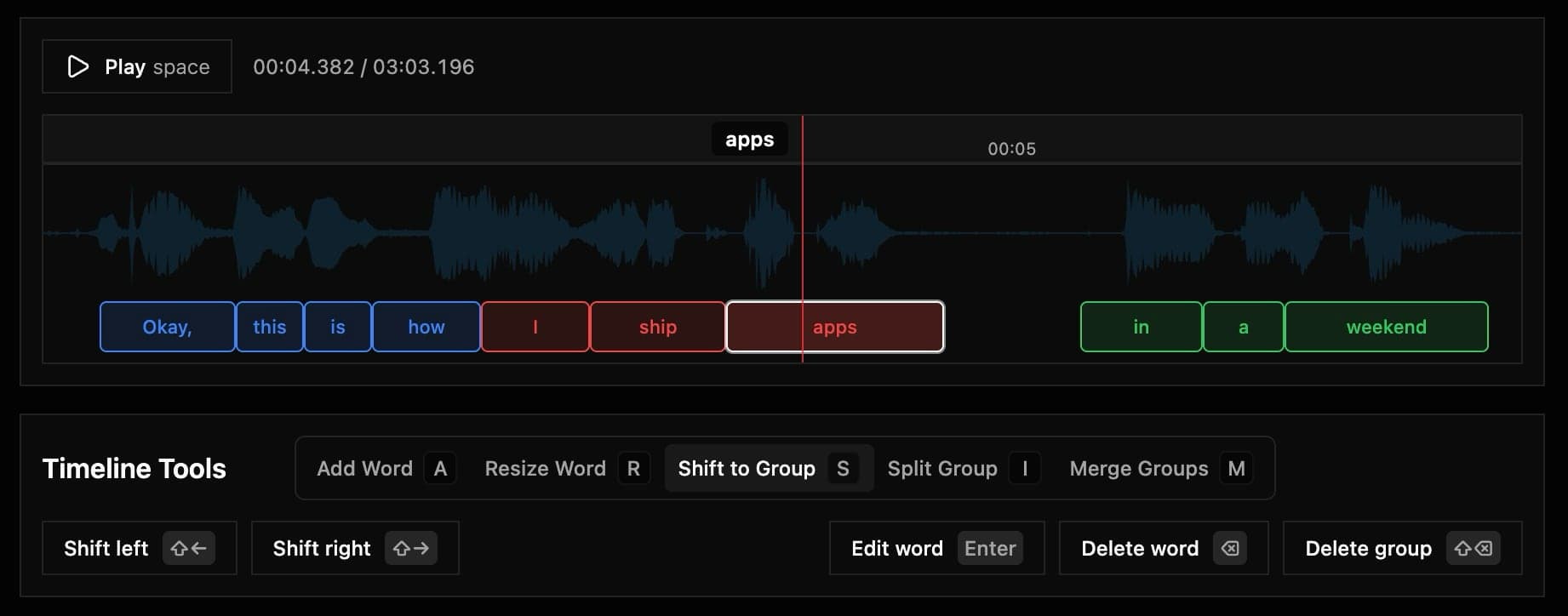
Timeline behavior
| Item | Current behavior |
|---|---|
| Grouping | Opt-in after transcription — click Start Grouping when ready |
| Layout | All words are edited on a single track |
| Visual feedback | Groups are color-coded |
| Conflict detection | Overlapping words are highlighted immediately |
| Multi-select | Drag on the word track to select multiple words |
If a word is marked as overlapping, adjust timing before export. Overlaps can create broken reading flow in captions.
Core keyboard shortcuts
| Action | Shortcut |
|---|---|
| Play / pause audio | Space |
| Edit selected word | Enter |
| Delete selected word | Backspace (⌫ / Retour) |
| Delete selected group | Shift + Backspace (Maj + Retour) |
| Select next word | Arrow Right |
| Select previous word | Arrow Left |
| Undo | Cmd + Z |
| Redo | Cmd + Shift + Z |
| Group selected words | Shift + Enter |
| Delete selected words | Shift + Backspace |
Multi-select
Drag across the word track to rubber-band select multiple words:
- Selected words are highlighted together
- The editor switches to Resize mode — drag handles on each selected word to adjust timing
- When you clear selection (click the timeline) or pick a single word, your previous tool mode returns
- Use Group selected or Delete selected from the toolbar (or the shortcuts above)
Dragging on the ruler or waveform seeks playback or clears selection — only drags that overlap the word track select words.
Tool modes (press one key)
| Mode | Key | What it does |
|---|---|---|
| Add Word | A | Add a word to the left or right |
| Resize Word | R | Enable resize handles on the selected word |
| Shift to Group | S | Move selected word and adjacent side words into neighboring group |
| Split Group | I | Create a new group that excludes the selected word |
| Merge Groups | M | Merge with the previous or next group |
Directional actions
- Select a word.
- Pick a mode (
A,S,I, orM). - Press
Shift + Arrow LeftorShift + Arrow Right.
Capti applies the action to the left or right side based on the arrow direction.